

Agencies get Prospect Search and a client portal, job adverts get a proper page builder, and your talent pools can now tell you who's hiring the people in them.
Prospect Search
- Find the people to pitch to. Describe who you want in one line, for example heads of engineering at Nordic SaaS companies of about 200 people, and Prospect Search builds a list of people across companies. It checks they still work there and shows each person's location flag.
- A full sheet of results. Results open as a sheet, 50 rows a page, with columns you can move, hide and keep the way you like. Company registry columns for Finland and Norway, a LinkedIn column, and drag to pan across wide sheets.
- Lists and history. Add people to a list with a name, note and colour, and find every list on the new Lists page. Every search you run is kept in your history, so you can reopen it as a sheet or save it as a list.
- Click a name to open the person, or add their company to your CRM in one click.
- Prospect Search shares the Talent Search canvas, with a beam of light in your accent colour that follows your cursor.
- If an email check can't run, Prospect Search says so instead of leaving the field blank.
- Agencies with a business development seat get a Search menu with Talent Search, Prospect Search and Lists.
Hiring signals
- Find companies hiring your pool's people. Find hiring companies on a talent pool looks for open roles that match the people in it, grouped by company with links to each posting. Tick the ones you want and they become prospect clients in your CRM, each with an optional draft share page, anonymised or co-branded, with your own intro.
- Open roles on company pages. Company pages now show the roles a company is advertising. The page loads straight away and the roles fill in as they're found. They also feed the company's signals and your followed companies feed.
Client portal
- Share a job with your client. Agencies can invite people from the client to a read-only portal for the job, with its candidates and progress. Preview the portal as your client sees it and change what they see as you go.
- Clients can ask to move candidates forward. A client can request that a candidate progresses, and you move them and schedule the next step.
- Pick or create the client on a job in one click from the job's Overview or Settings, and invite, resend or remove client people from the hiring team.
- No free client seat? Owners and admins go straight to Billing, and everyone else can request one.
- Agency company pages have a Jobs card near the top, with New job for that client.
Job adverts
- A page builder for adverts. The builder now has a block library on the left, the page outline on the right and the advert in the middle. Move, duplicate, hide or delete any block from the page itself. Hidden blocks stay in the builder but don't show on the public advert.
- New blocks and layouts. Add stats, features, testimonials and logo blocks, with grid and alternating layouts and gentle motion. Hero and call-to-action blocks have new layouts too.
- Design the apply page. An Apply tab lists each step of the application, opens the real apply page on that step and lets you style it as you go, through to the thank-you page with next steps and the team.
- One-page apply and Quick apply. Put the whole application on one page, or add a Quick apply block to the advert.
- Apply buttons always match your brand kit's button.
Jobs and companies
- Type any job title and press Enter to keep it, even when it isn't in the suggestions. Suggested titles read more naturally.
- Click a suggested skill to add it to Must haves. You can create a department while adding a team.
- Clients' logos show on the Jobs card on your dashboard.
- Regenerating a company after editing its description picks the sector and industry again from your new text, and Generate with AI fixes the company name's capitals.
- Searching and filtering your companies list updates the results as you go.
- A CV that's still being read now shows as in progress.
Sequences
- Pick a sequence from a dropdown, and the open sequence takes the full width.
- A new outcomes board shows where everyone in a sequence has got to.
- Each person can be in one running talent sequence and one business development sequence at a time. Starting or resuming another pauses the running one and tells you.
- Cards show the person's avatar with their company logo, LinkedIn on hover, and business development contacts open in a slide-out.
Plans and billing
- Founding pilot. While places last, the founding pilot plan leads the Billing page. Admins read and accept the pilot agreement in the app before paying by card or invoice.
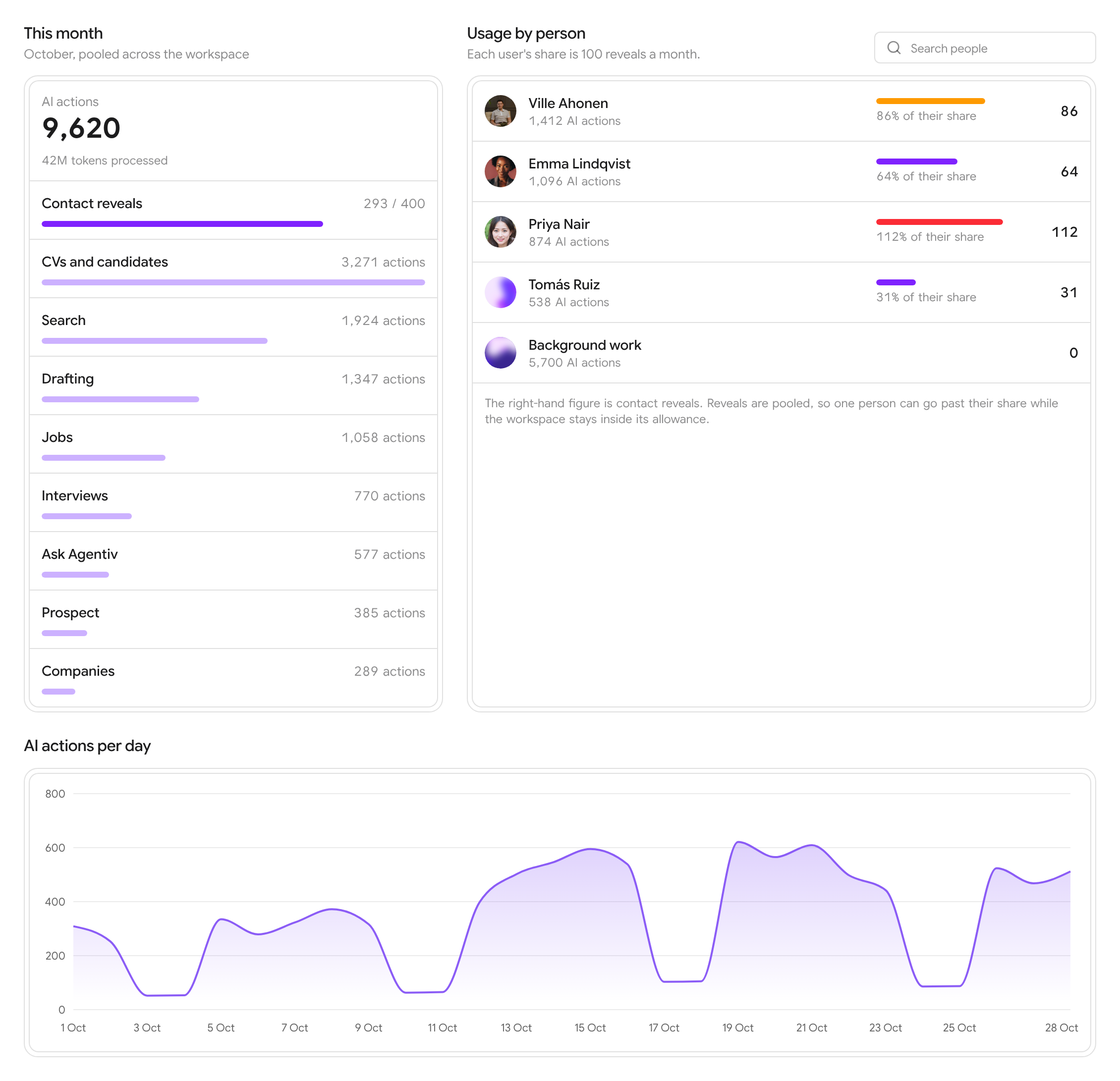
- A clearer Usage tab. Billing > Usage shows this month's AI actions by feature, usage per person with contact reveals, and a chart of AI actions per day.
Look and feel
- The sidebar no longer jumps when a page loads, and sections you open stay open as you move around.
- Your avatar and the sidebar controls sit in one row at the foot of the sidebar.
- The heart and the Agentiv wordmark in the sidebar are one link home.
Website
- The pricing page shows how many pilot places are left, live from the app.
- Every page shares its own link preview, so a shared walkthrough link shows that walkthrough instead of the home page.
- Our Slush walkthrough has new slides.
- Walkthroughs fill the whole screen in full screen on iPhone.
agentiv.md
- The menu fits on one line, the Human and Agent switch is icon-only, and the Agentiv button opens in a new tab.